Building a Telegram Bot for Homelab Management
...as soon as I finish shaving this yak.

I needed another app to download about like I needed a kick in the teeth.
And yet, with Discord having announced their intent to slaughter wholesale all digital privacy on their platform, I needed to make a change. Currently, with the exception of occasionally dropping in on a gaming conversation or funny banter in one of the handful of servers I’m still a member of, and the odd private chat with a couple of friends, I really only actively use Discord for one thing: a centralized location to receive notifications and alerts from the many self-hosted services that I run in my homelab. Things like Uptime Kuma, Sonarr, Radarr, Plex, Prometheus, and others, which can send those alerts and notifications either through direct integration with external services, or via webhooks to places like Discord, where anyone can create a server for free, add a few channels to keep things organized, and within minutes have one central, reliable hub, and (most importantly) it’s somebody else’s problem. Because, as any home labber knows, when you host everything yourself, if the server goes down—you don’t get an alert that the server went down.
So, what happened with Discord, anyway?
Discord, having apparently decided that one major data breach wasn’t enough, are compounding that astounding breach of consumer privacy and trust by stating that they will be implementing global, mandatory age verification for all users, which could involve their AI algorithm analyzing your behavior patterns and usage to decide if you’re an adult or not, sending them a selfie for an AI facial scan to determine your age, or, if neither of those work out in your favor, submitting government-issued identification. All very secure, of course, and entirely on the up-and-up, or so they claim. So confident are they in their AI model that they claim the vast majority of users should notice no difference whatsoever.
Even assuming that their confidence is not misplaced, this is not an invasion of privacy that I am willing to accept. So what is a poor chronically-online boy to do?
Build a Telegram bot, of course.
Why Telegram, despite its problems?
Telegram isn’t perfect. Truthfully, I don’t trust them much more than I trust Discord, or any platform that makes its money by hosting my data, for that matter. But Telegram is solving the immediate problem, albeit with a minor caveat: I need a reliable place to receive alerts when my infrastructure breaks, and I need it to be someone else's infrastructure so that when my infrastructure breaks, the alerts still get through. The caveat is: I have no intention of using Telegram to talk to real people. I have a phone, text messages, Signal, and Mastodon for that.
Telegram is simply a means to an end, a full swap of one particular aspect of my Discord usage that I couldn’t easily replicate somewhere else. Note that I did say easily; the very fact that I’m building a bot to replicate this native functionality of Discord belies any ease I might attribute to the transition.
I looked at self-hosted options. Every single one had the same fatal flaw: if my server is down, I don't get alerts that my server is down. That's not acceptable for a monitoring system. Something like Uptime Robot is fantastic, but the free tier is limited and the pricing was well out of budget for my use case.
Telegram has a real API with actual documentation. It's free. And most importantly, for now at least, it doesn't require me to prove I'm old enough to use it by scanning my face or submitting government ID. The bar is low, but they're clearing it.
The bridge I didn’t need to build
Most of my alerts came through Notifiarr, which has native Discord support but nothing for Telegram. The logical solution seemed to be building a bridge service that would translate Discord webhook payloads into Telegram API calls.
So I did that. Field transformations, color mappings, handling embedded images—all the little details that make webhook translations tedious. Got it working, felt accomplished.
Then I discovered, completely by accident, that Sonarr, Radarr, and Lidarr all have native Telegram integration built right in.
I'd been solving a problem that was already solved.
I laughed, deleted most of the bridge code, and configured the *arr apps to send notifications directly. But the exercise wasn't wasted—I'd learned the Telegram Bot API thoroughly enough that I started thinking about what else I could do with it. I had a bot token and API access. Why limit it to receiving alerts?
!! LOTS OF TECHNICAL STUFF INCOMING. YOU HAVE BEEN WARNED !!
Making it two-way
I have a homelab full of Docker containers that occasionally need to be restarted from my phone when something goes sideways. If I could check service status or restart a problematic container from wherever I happened to be, that would actually be useful. There were some slightly unwieldy options for this already, but nothing so clean and simple as a chatbot.
So I started building commands. One at a time, driven by actual need rather than speculative features.
Security first
The first order of business was making sure random people on the internet couldn't restart my servers. I built a simple decorator that checks incoming Telegram user IDs against a whitelist stored in environment variables. If you're not on the list, you get denied and your attempt gets logged.
That's it. No OAuth, no fancy auth flows. Just a hardcoded list of user IDs that are allowed to issue commands. It works because the threat model is narrow—I'm the only person who should be able to use this thing, and Telegram user IDs don't change.
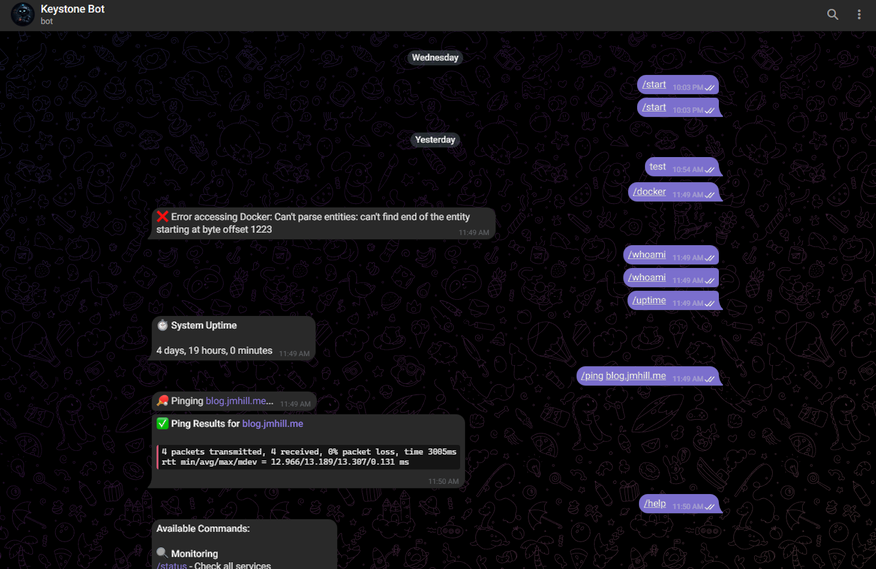
Once that was locked down, I added the basics: service monitoring, container listing, restart/start/stop operations. The stuff you want to do from your phone at 2am when you're nowhere near a computer.
Docker Swarm made it interesting
My homelab runs primarily on Docker Swarm, not standalone containers. The initial implementation just queried the local Docker socket and showed containers running on the same node the bot was on. Completely useless in a multi-node cluster.
What I actually wanted was stack-level health: homelab: 7/7 services running or media: 5/7 services running, 2 failed: plex, tautulli. That meant querying swarm services instead of containers and figuring out what "healthy" actually meant for each stack.
The first attempt assumed that for global services, running replicas should equal the number of ready nodes. Seems logical. It's also wrong when you have placement constraints. A global service constrained to only run on manager nodes will never have as many replicas as total nodes, and that's correct behavior, not a failure.
The fix was checking the actual number of tasks with desired-state=running instead of assuming what the count should be. If Docker wants 3 replicas and 3 are running, the service is healthy regardless of how many nodes you have.
This is the kind of thing that seems obvious after you've fixed it, but it took walking through the Swarm API with Claude Code to realize what I was doing wrong.
Generic webhooks
Some services don’t have native Telegram support and can't use Notifiarr. They need a generic webhook endpoint to POST to.
I could have spun up a separate webhook listener, but the bot was already running an async event loop via python-telegram-bot. Why not just embed an aiohttp server directly into the same process?
I used the post_init and post_stop lifecycle hooks to start and stop the HTTP server alongside the bot's polling loop. It listens on port 8080 (Traefik handles TLS), accepts JSON payloads, and forwards them to my Telegram chats.
The formatting function extracts useful information from arbitrary JSON structures by looking for common patterns—keys named service or source or app for identifying what's alerting, keys named message or text or description for the content. It picks emojis based on severity levels. It works well enough that I don't think about it.
Stack-level control via Portainer
Managing individual containers is fine, but stack-level control is where the leverage is. If a whole stack is misbehaving, I don't want to restart services one by one—I want to bounce the entire thing and let it come back up clean.
Portainer has an API for this. I wrote a small helper module that wraps the calls, then added commands: /portainer to list everything, /portainer start and /portainer stop for control.
Now I can restart an entire application stack from my phone without SSH, without VPN, without anything except a Telegram message.
By the way, if you're wondering why I involved Portainer in this process at all, it's because directly calling the Docker API makes the process slightly more complicated–Portainer allows you to interact with stacks in a simple API call to /api/stacks/{id} whereas Docker inherently treats stacks as groups of services with matching labels, necessitating more complexity in the API requests.
Self-healing
Bots crash. Networks hiccup. Telegram's API has occasional issues. The bot needed to detect problems and recover automatically instead of requiring manual intervention every time.
I added a /health endpoint that actually checks things instead of blindly returning 200 OK. It verifies Telegram connectivity by calling bot.get_me() and Docker socket access by running client.ping(). If either fails, it returns 503 with details about what's broken.
I then wired that into Docker's health check system. Every 30 seconds, the container runs a Python script that hits the /health endpoint. Anything other than HTTP 200 counts as a failure. Three consecutive failures (90 seconds unhealthy) triggers the restart policy.
The restart policy always restarts on failure, with a 10-second delay between attempts and a maximum of 5 attempts in a 120-second window. This prevents infinite restart loops while still giving multiple chances to recover from transient issues.
It works. The bot has recovered from network issues, temporary Telegram API problems, and the Docker daemon restarting, all without me having to SSH in and fix it manually.
What it does now
The whole thing lives, for now, in a single Docker Swarm service. All the Python code is under src/—bot.py with the main application and command handlers, config.py for environment variables, portainer.py for stack management, healthcheck.py for the Docker health check.
The container has read-only access to the Docker socket for querying and managing containers, and read-only access to /proc for system info like uptime. Traefik handles TLS for the webhook endpoint. Logs rotate at 10MB with 3 files retained.
From any Telegram chat where I've authorized myself, I can check service health, view swarm status grouped by stack, restart containers, start or stop entire Portainer stacks, ping hosts, check uptime, and receive alerts from anything that can POST JSON to an HTTP endpoint.
It works from my phone even when I'm not on VPN or connected to my home network. Authorization is tight enough that I'm not worried about unauthorized access, and logging means I'd know if someone tried.
What I've learned
Always check if the problem is already solved before building a solution. I wasted time on the Notifiarr bridge before discovering native Telegram support existed.
(How did I not know? Good question–I've been using these apps for most of a decade now. Truth is, I probably noticed it at some point and just forgot, because it never really occurred to me that I may need or want to use it.)
Iterate based on actual need, not hypothetical features. The bot started as basic container listing and grew one command at a time, each driven by something I actually wanted to do. There are still ideas on the TODO list—Proxmox integration, container creation, more Portainer operations—but I haven't built them yet because I haven't needed them.
Context matters in distributed systems. The obvious solution—assuming global services should have replicas equal to node count—was wrong because I wasn't accounting for placement constraints. Understanding actual system behavior beats assuming you know how it works.
Build security in from the start. The authorization decorator was there from day one. Adding security after you've already built the thing is exponentially harder than designing it in from the beginning.
Observability enables self-healing. The /health endpoint does double duty—it's both a monitoring tool and the trigger for automatic recovery. Knowing something is broken is only useful if you can fix it without manual intervention.
Where it goes from here
The code lives on my Gitea instance with automated builds via Gitea Actions. Every push to main triggers a Docker build that goes to the built-in registry. Deployment is fully automated—push code, wait 30 seconds, new version is running.
I'll probably add Proxmox integration eventually. Being able to query VM status and control guest systems from Telegram would be useful. Container creation and more advanced Portainer operations are on the list too, but they're not urgent. The bot does what I need it to do right now.
What matters is that I own it. Discord can implement whatever surveillance they want, Telegram can do whatever Telegram does—it doesn't affect me because I'm not dependent on either platform behaving a particular way. I'm just using Telegram's infrastructure to receive messages and send commands. If they break that, I'll move to something else.
So, ultimately, it's a Telegram bot that manages my servers. It does exactly what I built it to do. When I need it to do something else, I'll add that too.
Thanks for reading. If you have questions, comments, or suggestions, feel free to sign up and leave them below. The Github repo for this project can be found here.


